
Download Zecwallet Lite – Zcash wallet, secure wallet, mobile wallet, privacy wallet, shielded transactions, Zcash, Android app, Zecwallet, Zcash mobile, Zecwallet Android, Zecwallet mobile
Overview
Zecwallet Lite is a mobile application designed for users seeking a secure and private way to manage their Zcash holdings on Android devices. As a light client, it enables users to send and receive fully shielded transactions—offering maximum privacy by concealing sender, receiver, and transaction amount details. The software is particularly suited for individuals who value financial privacy and require a reliable solution for on-the-go Zcash transactions.
It supports transparent address interactions as well, allowing users to send and receive funds to and from standard Zcash addresses. The application syncs with the Zcash blockchain in seconds, ensuring rapid transaction processing and real-time balance updates. Its compatibility with desktop Zecwallet Lite clients provides a seamless experience across devices, ideal for users who manage their Zcash across multiple platforms.
The Zcash Foundation developed the software, indicating a commitment to open-source privacy technology and decentralized finance. Real-world use cases include daily Zcash transactions, peer-to-peer payments, and secure fund storage for privacy-conscious individuals. The developer did not provide additional system requirements.
Key Features & Capabilities
- Shielded Transactions by Default – All transactions are fully shielded, ensuring that sender, recipient, and amount remain private. This feature is ideal for users who prioritize anonymity in financial activity.
- Support for Transparent Addresses – Users can send and receive funds to standard Zcash addresses, offering flexibility for interoperability with other wallets and platforms.
- Instant Blockchain Sync – The light client architecture allows the app to sync with the Zcash blockchain in seconds, minimizing wait times and enabling quick transaction confirmation.
- Memorandum Functionality – Users can attach memos of any length to transactions, useful for adding notes, payment references, or private messages.
- Multi-Device Compatibility – Seamless integration with desktop Zecwallet Lite clients ensures consistent access and synchronization across devices.
- Mobile-First Design – The interface is optimized for Android, offering intuitive navigation and responsive controls for mobile use.
These capabilities empower users to manage their Zcash securely and efficiently while maintaining privacy. For example, a user can send a shielded payment to a friend with a custom memo, sync the transaction instantly, and verify it on a desktop wallet without delay. The ability to use both shielded and transparent addresses makes it suitable for diverse transaction needs, from private transfers to public network interactions.
User Interface, Workflow & Performance
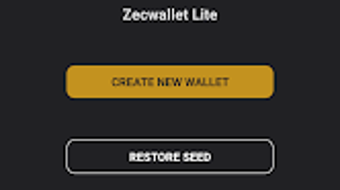
Zecwallet Lite features a clean, minimalist interface designed for ease of use on mobile devices. Navigation is straightforward, with core functions such as sending, receiving, and viewing transaction history accessible from the main screen. The workflow is optimized for quick actions—users can initiate a transaction with minimal taps, and the app provides real-time feedback during processing.
The light client design contributes to efficient performance, reducing the need for extensive device storage and bandwidth. However, exact performance details were not specified. The developer did not provide resource usage information, so general behavior patterns are assumed.
Stability is expected to be consistent, given the app’s lightweight nature and alignment with established Zecwallet standards. The app is designed to function reliably under typical mobile conditions, with no reported issues related to crashes or freezes. Users can expect smooth operation during routine tasks, though real-world performance may vary based on individual device capabilities.
Compatibility & System Requirements
Zecwallet Lite is designed exclusively for Android devices. The software version is 1.0.0, and the installation size is 12.5 MB, indicating a lightweight footprint. This makes it suitable for a wide range of Android smartphones and tablets, including lower-end models.
The developer did not specify minimum OS version, hardware requirements, or CPU/RAM specifications. Compatibility information was partially provided. Users are advised to ensure their device runs a recent version of Android to support secure network communication and app functionality.
The app is available as a free download, with no in-app purchases or subscription fees. For users managing Zcash across devices, the ability to sync with desktop Zecwallet Lite clients enhances cross-platform usability.
Pros and Cons
Pros
- Offers fully shielded transactions by default for maximum privacy
- Supports both shielded and transparent Zcash addresses
- Fast blockchain sync in seconds
- Intuitive mobile interface with simple navigation
- Compatible with desktop Zecwallet Lite clients
- Free to download and use
Cons
- Only available for Android, limiting cross-platform access
- No detailed system requirements provided
- Resource usage and performance data not disclosed
- Exclusive focus on Zcash may limit broader utility
- Requires internet connection for full functionality
FAQ Section
Is Zecwallet Lite available for iOS?
Zecwallet Lite is currently only available for Android devices. The developer has not announced plans for an iOS version.
Is the app secure?
Yes, Zecwallet Lite uses advanced cryptographic protocols to ensure secure transaction handling and private data storage. It is developed by the Zcash Foundation, a trusted entity in privacy-focused blockchain technology.
Does Zecwallet Lite require an internet connection?
Yes, an active internet connection is required to sync with the blockchain, send and receive transactions, and verify balances.
Can I use Zecwallet Lite offline?
While basic wallet functions like viewing balances may work briefly after syncing, full functionality—including sending and receiving—requires an internet connection.
Is Zecwallet Lite free to use?
Yes, the software is completely free to download and use. There are no hidden fees, subscriptions, or in-app purchases.
Final Thoughts
Zecwallet Lite stands out as a reliable, privacy-focused mobile wallet for Zcash users. Its emphasis on shielded transactions, instant sync, and cross-device compatibility makes it a strong choice for individuals who value financial privacy and convenience. The clean interface and straightforward workflow enhance usability, while the free model ensures accessibility for all users.
Although it is limited to Android and lacks detailed system specifications, its core functionality is robust and well-aligned with privacy-first principles. For anyone seeking a secure, lightweight Zcash wallet on mobile, Zecwallet Lite delivers a compelling experience. Download Zecwallet Lite now.






.png)
